
Write a benchmark#
Note
The simplest way to create a benchmark is to copy an existing folder and to adapt its content. Two GitHub template repositories are available: ML benchmarks and Optimization benchmarks.
This page describes in details the structure of a benchopt benchmark and how to write one from scratch. A shorter introduction to writing a benchmark is available in the Get started guide, and more advanced features are described in the User guide.
No matter your domain, a benchopt benchmark maps your problem onto three components: some Datasets, an Objective, and some Solvers:
Your context |
Dataset |
Objective |
Solver |
|---|---|---|---|
ML classification |
train & test data
from sklearn, OpenML, …
|
test accuracy, AUC, … |
models
(logreg, xgboost, …)
|
Optimization |
problem design, X, y, … |
objective value,
suboptimality gap
|
iterative solvers |
Deep learning |
dataloader + network |
validation accuracy |
optimizer |
Infrastructure |
large file dataset |
throughput |
data-loading strategy |
The definition of a benchmark is mostly a matter of deciding how to map your problem onto these three components, and then implementing connectors to link them together.
Each component is a single Python file. The benchmark lives in a folder with this structure:
my_benchmark/
├── objective.py  # contains the definition of the objective
├── datasets/
│   ├── dataset1.py  # some dataset
│   └── dataset2.py  # some dataset
├── solvers/
│   ├── solver1.py  # some solver
│   └── solver2.py  # some solver
└── plots/
    └── custom_plot.py  # (optional) some custom plot
Benchopt provides a set of base classes to implement these components, and gives a way to link them together. The following schema summarizes the dependencies structure between the different components:
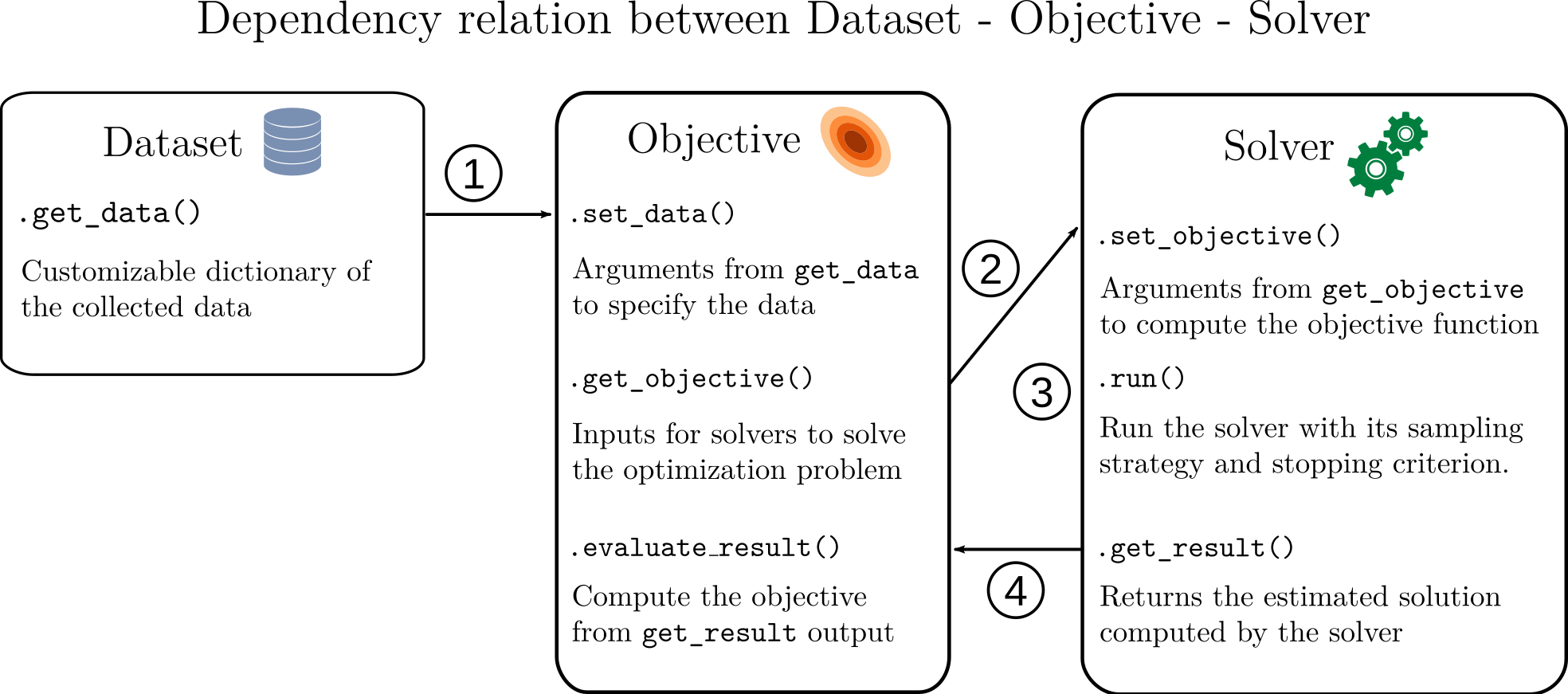
All three component classes share the following features:
name: human-readable identifier used to filter them in the CLI and to identify the results in tables and plots. It must not contain a/, which would make it ambiguous with a-s/-dfile selector.requirements: declare package dependencies for a component. See Specifying requirements.parameters: run the same class with multiple configurations (grid over hyper-parameters, dataset variants, …). See Parametrization.get_seed(): obtain a reproducible seed for stochastic components (simulated data, random initialisations, …). See Reproducibility helpers: seeding and run artifacts.get_run_output_path(): get a per-run directory to save artifacts (models, plots, logs, …) scoped to the current (dataset x objective x solver x repetition) combination. See Reproducibility helpers: seeding and run artifacts.
1. Datasets#
A dataset provides the data on which all solvers are evaluated.
Typical implementations load a real dataset from disk or a repository,
generate synthetic data, or return a dataloader and a network.
A dataset class inherits from benchopt.BaseDataset and implements
one required method:
get_data(): Load or generate your data — read from disk, download from a repository, generate synthetic samples, or set up a dataloader. Return everything as a dictionary; the keys become the named arguments ofObjective.set_data.
Note
When multiple datasets share a similar loading interface (e.g. datasets
accessible via fetch_openml), a single Dataset class can cover
them all using the parameters class attribute:
from benchopt import BaseDataset
from sklearn.datasets import fetch_openml

class Dataset(BaseDataset):
    name = "OpenML"
    parameters = {"dataset_id": [40994, 1590]}  # adult, covertype

    def get_data(self):
        data = fetch_openml(data_id=self.dataset_id, as_frame=True)
        return dict(X=data.data, y=data.target)
See Parametrization for the full parametrization API.
Dataset Example#
from benchopt import BaseDataset
from sklearn.datasets import make_classification
from sklearn.model_selection import train_test_split

class Dataset(BaseDataset):
    name = "My dataset"

    def get_data(self):
        X, y = make_classification()
        X_train, X_test, y_train, y_test = train_test_split(
            X, y, test_size=0.2, random_state=0
        )
        return dict(
            X_train=X_train, y_train=y_train,
            X_test=X_test, y_test=y_test,
        )
from benchopt import BaseDataset
import numpy as np

class Dataset(BaseDataset):
    name = "My dataset"

    def get_data(self):
        rng = np.random.default_rng(0)
        A = rng.standard_normal((100, 50))
        b = rng.standard_normal(100)
        return dict(A=A, b=b)
from benchopt import BaseDataset
import numpy as np

class Dataset(BaseDataset):
    name = "My dataset"
    parameters = {"data_size": [100_000]}

    def get_data(self):
        return dict(data=np.zeros((self.data_size, 100)))
Optional features#
prepare(): expensive one-time setup (downloads, extraction, preprocessing), cached by joblib. Default toget_data()if not implemented. See Preparing datasets for details and usage.Custom data paths: expose configurable file paths to benchmark users via
benchopt.config.get_data_path(). See Customising data file paths for details.
2. Objective#
The objective defines what is measured and how. It receives the data from
the dataset, exposes training inputs to each solver, and computes the metrics
for each result provided by the solver: accuracy, AUC, loss, objective value,
etc. It is defined in objective.py as a class inheriting from
benchopt.BaseObjective, with 3 required methods:
set_data(**data): Receive the data from the dataset and store what the objective needs. typically the train/test split, labels, or pre-computed features. Called once per dataset.get_objective(): Return the inputs solvers need to train/minimize/run – typically the training features and labels, or the problem definition. The dictionary is forwarded directly to each solver’sset_objective.evaluate_result(**result): Compute your metrics from the solver’s output – e.g. callmodel.predict()on the fitted model and measure accuracy, AUC, loss, etc. on the test set. The arguments come fromSolver.get_result; test data stored inset_datais available asself.*. Return a dictionary of metric names to values; keys are prefixed withobjective_in the resulting dataframe (e.g.objective_accuracy).
Note
evaluate_result can also return a list of dicts to record multiple
rows per run — useful for cross-validation folds or sub-problems.
Objective Example#
from benchopt import BaseObjective

class Objective(BaseObjective):
    name = "My ML benchmark"
    sampling_strategy = "run_once"

    def set_data(self, X_train, y_train, X_test, y_test):
        self.X_train, self.y_train = X_train, y_train
        self.X_test, self.y_test = X_test, y_test

    def get_objective(self):
        return dict(X_train=self.X_train, y_train=self.y_train)

    def evaluate_result(self, model):
        y_pred = model.predict(self.X_test)
        y_proba = model.predict_proba(self.X_test)[:, 1]
        return dict(
            accuracy=accuracy_score(self.y_test, y_pred),
            auc=roc_auc_score(self.y_test, y_proba),
        )
from benchopt import BaseObjective
import numpy as np

class Objective(BaseObjective):
    name = "My optimization benchmark"

    def set_data(self, A, b):
        self.A, self.b = A, b

    def get_objective(self):
        return dict(A=self.A, b=self.b)

    def evaluate_result(self, x):
        residual = self.A @ x - self.b
        return dict(value=0.5 * np.dot(residual, residual))

    def get_one_result(self):
        return dict(x=np.zeros(self.A.shape[1]))
from benchopt import BaseObjective
import time

class Objective(BaseObjective):
    name = "Dataloader throughput"
    sampling_strategy = "run_once"
    parameters = {"batch_size": [64, 256]}

    def set_data(self, data):
        self.data = data

    def get_objective(self):
        return dict(data=self.data, batch_size=self.batch_size)

    def evaluate_result(self, dataloader):
        n_samples, t0 = 0, time.perf_counter()
        for batch in dataloader:
            n_samples += len(batch)
        runtime = time.perf_counter() - t0
        return dict(
            samples_per_second=n_samples / runtime,
            runtime=runtime,
        )

    def get_one_result(self):
        return dict(dataloader=self.data)
Optional features#
skip(): skip incompatible dataset/objective combinations.get_one_result(): return a dummy result forbenchopt testvalidation.save_final_results(): persist artefacts (models, arrays, …) after the last run as a.pklfile.
3. Solvers#
A solver is the method being benchmarked — a scikit-learn estimator, a
PyTorch training loop, an optimization algorithm, etc. It inherits from
benchopt.BaseSolver and defines three methods:
set_objective(**objective_dict): Receive training data from the objective and prepare the solver — store features and labels, initialise the model or optimizer, set hyper-parameters. Not timed.run(): Train your model or run your algorithm here — this is the only timed part. Store the result onselffor retrieval inget_result. For iterative solvers, see Evaluating an iterative method.get_result(): Return the trained model or solution — whateverevaluate_resultexpects. The dictionary keys must match the argument names ofObjective.evaluate_result.
Solver Example#
from benchopt import BaseSolver

class Solver(BaseSolver):
    name = "My solver"

    def set_objective(self, X_train, y_train):
        self.X_train, self.y_train = X_train, y_train

    def run(self, _):
        from sklearn.linear_model import LogisticRegression
        self.model = LogisticRegression().fit(
            self.X_train, self.y_train
        )

    def get_result(self):
        return dict(model=self.model)
from benchopt import BaseSolver
import numpy as np

class Solver(BaseSolver):
    name = "Gradient descent"

    def set_objective(self, A, b):
        self.A, self.b = A, b
        self.x = np.zeros(A.shape[1])

    def run(self, n_iter):
        grad = self.A.T @ (self.A @ self.x - self.b)
        step = 1 / np.linalg.norm(self.A) ** 2
        for _ in range(n_iter):
            self.x -= step * grad

    def get_result(self):
        return dict(x=self.x)
from benchopt import BaseSolver
import torch

class Solver(BaseSolver):
    name = "PyTorch dataloader"

    def set_objective(self, data, batch_size):
        self.dataloader = torch.utils.data.DataLoader(
            torch.utils.data.TensorDataset(torch.from_numpy(data)),
            batch_size=batch_size,
        )

    def run(self, _):
        pass

    def get_result(self):
        return dict(dataloader=self.dataloader)
Note
Sampling strategy: For iterative methods, the methods are often evaluated at each iteration. Benchopt provides a way to control the frequency of these evaluations and to select how to grow the compute budget. You can find more details about this in the Evaluating an iterative method guide.
Optional features#
skip(): skip incompatible solver/objective combinations.warm_up(): absorb one-time costs (e.g. JIT compilation) before timed runs.pre_run_hook(): called before eachrunwith the same argument; useful for JAX precompilation over varying iteration counts.
Defining the benchmark visualization#
Benchopt provides a web-based and a matplotlib interface to visualize the
results of a benchmark. Default plots are provided to visualize the results,
but can be customized by defining custom plots.
These plots integrate seemlessly with the benchmark and are automatically generated for each benchmark run, or using the benchopt plot command.
Custom plots can be defined to visualize specific quantities of interest
during the benchmark. By default, BenchOpt provides some standard plots such as
the objective curve, box plots and bar plots. To create custom plots, users can
define a class that inherits from benchopt.BasePlot in a plots
folder. More information about creating custom plots can be found in the
Add a custom plot to a benchmark guide.