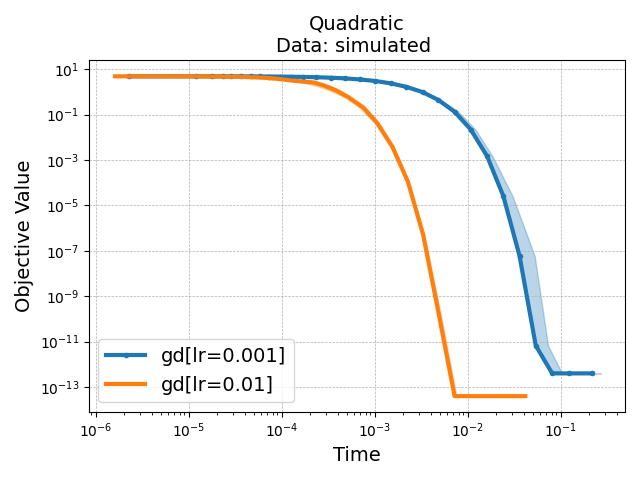
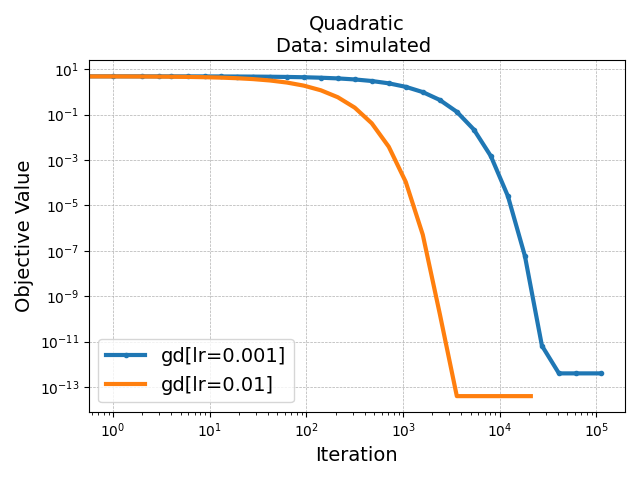
This example demonstrates how to run an existing benchmark with benchopt.
# Import example helpers to define the benchmark and# programmatically call the CLI.frombenchopt.helpers.run_examplesimportExampleBenchmarkfrombenchopt.helpers.run_examplesimportbenchopt_cli
We will use the minimal benchmark defined in the examples folder.
The benchmark objective is a simple minimization task:
\[\min_{\hat{X}} \; \mathrm{MSE}(X, \hat{X})\]
We define:
an Objective that evaluates MSE between X and X_hat;
a Dataset that generates a random matrix X;
a Solver that minimizes this objective with gradient descent. It is
parametrized with parameter lr for the step size.
frombenchoptimportBaseObjectiveimportnumpyasnpclassObjective(BaseObjective):# Name of the Objective functionname='Quadratic'# The three methods below define the links between the Dataset,# the Objective and the Solver.defset_data(self,X):"""Set the data from a Dataset to compute the objective. The argument are the keys of the dictionary returned by ``Dataset.get_data``. """self.X=Xdefget_objective(self):"Returns a dict passed to ``Solver.set_objective`` method."returndict(X=self.X)defevaluate_result(self,X_hat):"""Compute the objective value(s) given the output of a solver. The arguments are the keys in the dictionary returned by ``Solver.get_result``. """returndict(value=np.linalg.norm(self.X-X_hat))defget_one_result(self):"""Return one solution for which the objective can be evaluated. This function is mostly used for testing and debugging purposes. """returndict(X_hat=1)
frombenchoptimportBaseDatasetimportnumpyasnpclassDataset(BaseDataset):# Name of the Dataset, used to select it in the CLIname='simulated'# ``get_data()`` is the only method a dataset should implement.defget_data(self):"""Load the data for this Dataset. Usually, the data are either loaded from disk as arrays or Tensors, or a dataset/dataloader object is used to allow the models to load the data in more flexible forms (e.g. with mini-batches). The dictionary's keys are the kwargs passed to ``Objective.set_data``. """returndict(X=np.random.randn(10,2))
frombenchoptimportBaseSolverimportnumpyasnpclassSolver(BaseSolver):# Name of the Solver, used to select it in the CLIname='gd'# By default, benchopt will evaluate the result of a method after various# number of iterations. Setting the sampling_strategy controls how this is# done. Here, we use a callback function that is called at each iteration.sampling_strategy='callback'# Parameters of the method, that will be tested by the benchmark.# Each parameter ``param_name`` will be accessible as ``self.param_name``.parameters={'lr':[1e-3,1e-2]}# The three methods below define the necessary methods for the Solver, to# get the info from the Objective, to run the method and to return a# result that can be evaluated by the Objective.defset_objective(self,X):"""Set the info from a Objective, to run the method. This method is also typically used to adapt the solver's parameters to the data (e.g. scaling) or to initialize the algorithm. The kwargs are the keys of the dictionary returned by ``Objective.get_objective``. """self.X=Xself.X_hat=np.zeros_like(X)defrun(self,cb):"""Run the actual method to benchmark. Here, as we use a "callback", we need to call it at each iteration to evaluate the result as the procedure progresses. The callback implements a stopping mechanism, based on the number of iterations, the time and the evoluation of the performances. """whilecb():self.X_hat=self.X_hat-self.lr*(self.X_hat-self.X)defget_result(self):"""Format the output of the method to be evaluated in the Objective. Returns a dict which is passed to ``Objective.evaluate_result`` method. """return{'X_hat':self.X_hat}
#loaded from minimal_benchmark/config.ymlplot_configs:Subopt. (log):plot_kind:objective_curvescale:loglogRuntimes:plot_kind:bar_chart
Benchopt is running!
Loading objective, datasets and solvers... done.
simulated
|--Quadratic
No seed was specified. Selected global seed: 0
|--gd[lr=0.001]:done (not enough run) |--gd[lr=0.01]:done (not enough run)Saving result in: temp_benchmark_irh93pl1/minimal_benchmark/outputs/benchopt_run_2026-09-21_11h13m05.parquet
Rendering benchmark results...
Processing
temp_benchmark_irh93pl1/minimal_benchmark/outputs/benchopt_run_2026-09-21_11h1
3m05.parquet
done
Writing results to
temp_benchmark_irh93pl1/minimal_benchmark/outputs/minimal_benchmark_benchopt_r
un_2026-09-21_11h13m05.html
Writing minimal_benchmark index to
temp_benchmark_irh93pl1/minimal_benchmark/outputs/minimal_benchmark.html
This runs the benchmark named minimal_benchmark located in the
examples folder.
The parameters n controls the number of point on the curves, while r
controls the number of repetitions for each solver. The repetitions are used
to compute the median and quartiles of the curves.
To get a more precise curve, you can increase n and r:
Benchopt is running!
Loading objective, datasets and solvers... done.
simulated
|--Quadratic
No seed was specified. Selected global seed: 0
|--gd[lr=0.001]:done |--gd[lr=0.01]:doneSaving result in: temp_benchmark_irh93pl1/minimal_benchmark/outputs/benchopt_run_2026-09-21_11h13m07.parquet
Rendering benchmark results...
Processing
temp_benchmark_irh93pl1/minimal_benchmark/outputs/benchopt_run_2026-09-21_11h1
3m07.parquet
done
Writing results to
temp_benchmark_irh93pl1/minimal_benchmark/outputs/minimal_benchmark_benchopt_r
un_2026-09-21_11h13m07.html
Writing minimal_benchmark index to
temp_benchmark_irh93pl1/minimal_benchmark/outputs/minimal_benchmark.html
Here, the display is not ideal because both solvers reach convergence very
quickly. You can change the display by selecting the scale of the axis in
the plot configuration panel.
Go to the Change plot banner at the top of the HTML file, and change the
scale to loglog on the drop down menu.
Note that for convenience, this can be saved as a view in the configuration
of the benchmark. See here for more details.
Here, clicking on Subopt.(log) in the Available plots above the
figure will take you to a view with the right scale, and looking at
suboptimality instead of objective value.
Once the benchmark has be run, you can also generate pdf figures using the
benchoptplot command with --no-html option:
Save objective_curve_simulated_Quadratic_objective_value_Time as:
temp_benchmark_irh93pl1/minimal_benchmark/outputs/objective_curve_simulated_Qu
adratic_objective_value_Time.pdf
Save objective_curve_simulated_Quadratic_objective_value_Iteration as:
temp_benchmark_irh93pl1/minimal_benchmark/outputs/objective_curve_simulated_Qu
adratic_objective_value_Iteration.pdf
See here for more details on how to customize
the plots and define your own visualization.
Total running time of the script: (0 minutes 8.121 seconds)